
For cleaning companies that sell by phone and email
Stop scrolling Google Maps.
Get a call list in two minutes.
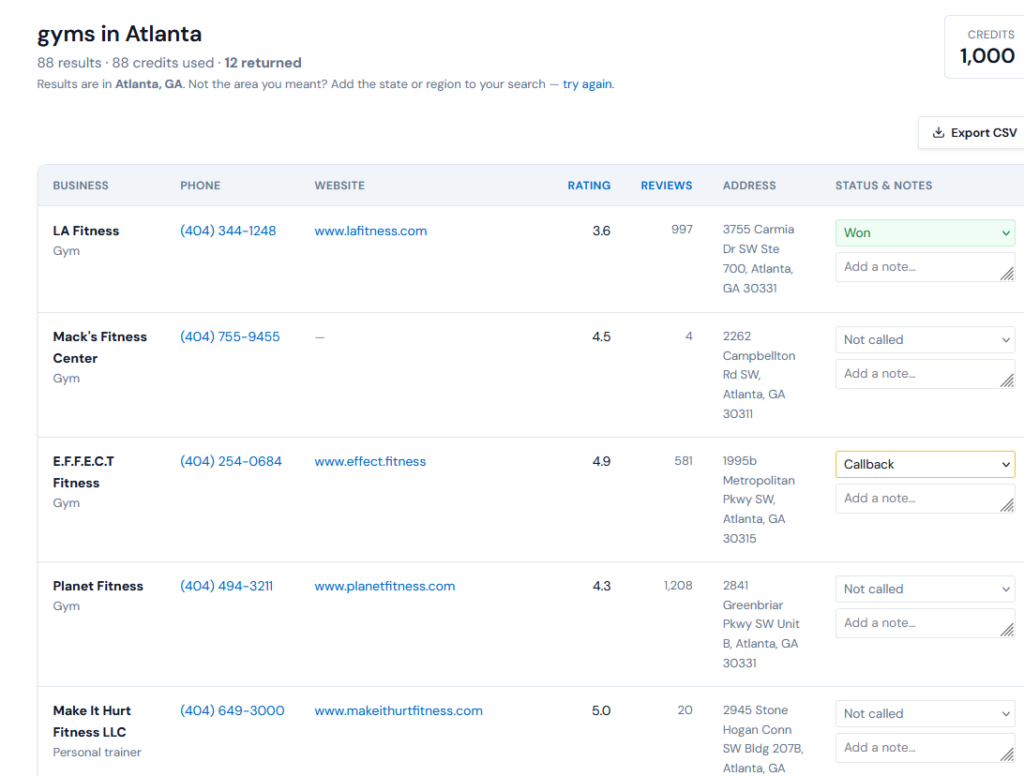
Type a business type and a city. You get back the offices, gyms, clinics and restaurants in that area, each with a phone number or a website, an address and a Google rating. When a business lists an email on its website, you get that too. Work through the list here, mark who said yes, and export it to CSV whenever you want.
- Free: 2 searches, 10 leads each
- No card
- Emails included
- Paid plans from $19
The obvious question
Google Maps is free. Copying it out by hand isn't.
You can find these businesses yourself. The cost isn’t finding them, it’s the copying. Open a listing, copy the name, copy the number, tab back, scroll, repeat. For an email it’s worse: Maps doesn’t show one, so you open the website and hunt for a contact page. An hour of that gets you maybe thirty or forty rows, and part of that hour goes on clicking past listings that are permanently closed or have no phone number.
This does the copying. Closed listings and businesses with no phone or website are dropped before the list reaches you, and before you’re charged for them. Where a business lists an email on its own website, it’s already in the row. What you get is a list you can start dialing from.
How it works
Three steps, and the third one is the point.
Anyone can sell you a list. What decides whether cold calling works is whether you remember who to call back on Thursday, so the tracking is built in rather than bolted on.
01 ----- Targeting
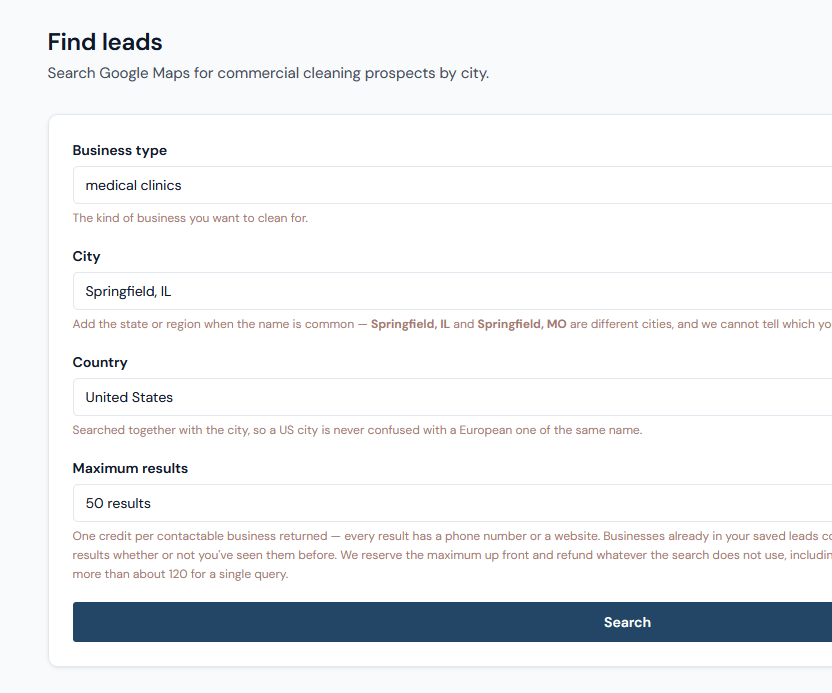
Pick a business type and a city.
Free text, not a fixed menu: you know which buildings in your area need cleaning contracts better than a dropdown does. Add the state or region when the city name is a common one, choose your country from the list, and set how many results you want back.
- office buildings
- medical clinics
- gyms
- restaurants
- schools
02 ----- The list
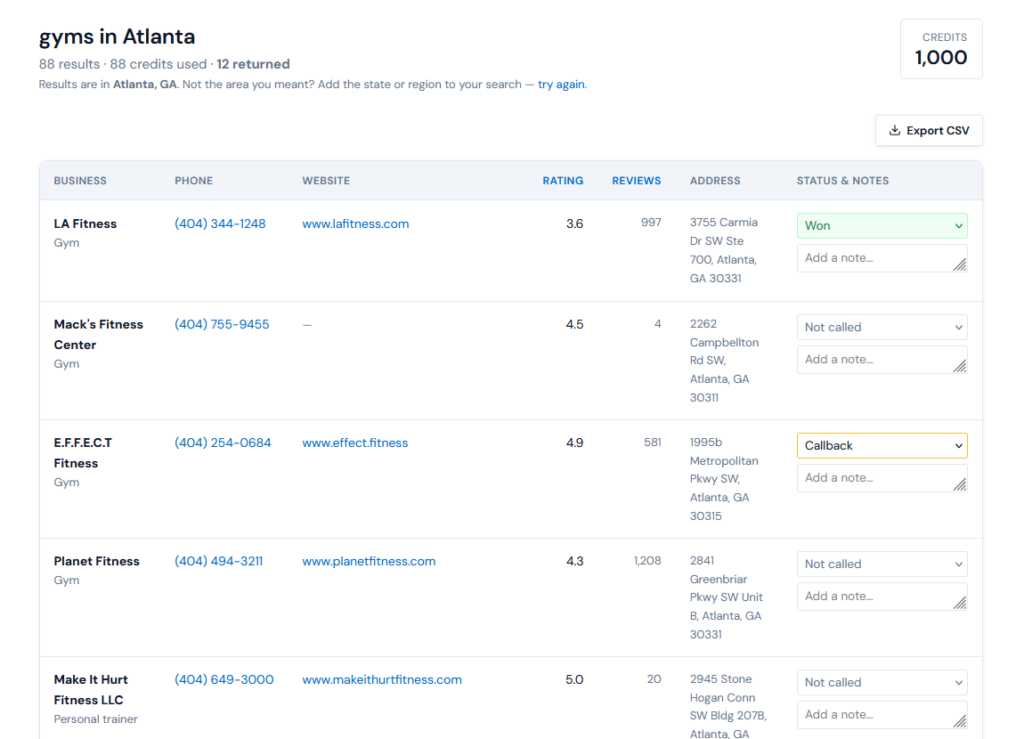
Get contactable businesses back.
Pulled from Google Maps when you search, not served from a database somebody assembled two years ago. Every row has a phone number or a website, and on US searches an email too, where the business lists one on its own site. The rating and review count come along as well, a rough sign of how established a business is.
- phone
- website
- address
- rating
03 ----- The follow-up
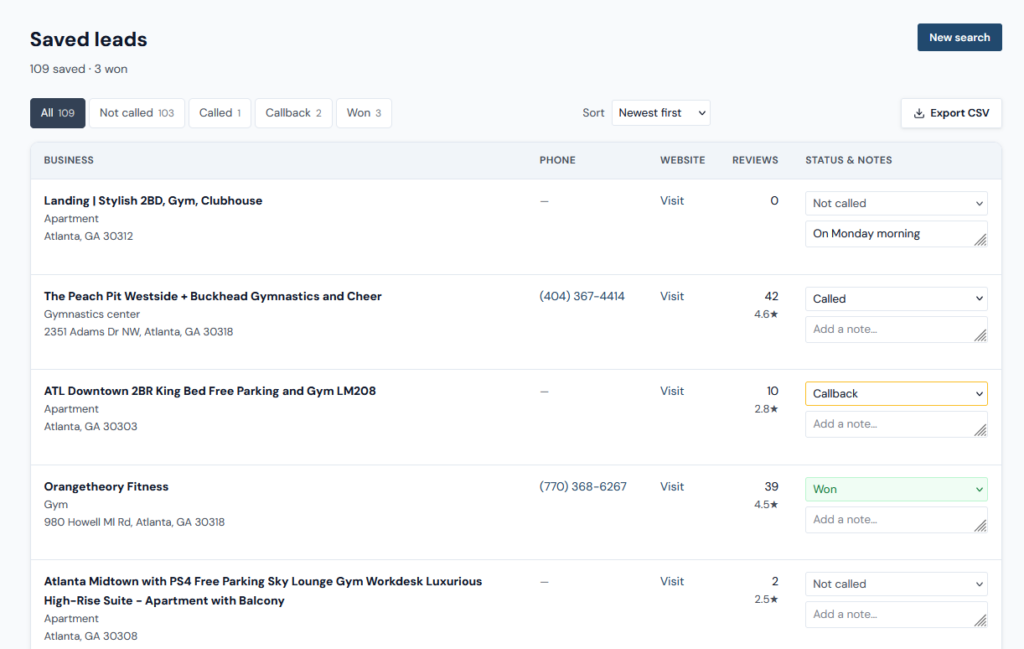
Call, mark, and remember.
Mark each business called, flag the ones to call back, record the wins. Write a note about what the office manager said, and when to try again, so next week you’re not starting from nothing. Download everything as a CSV whenever you want. It’s your list, and it stays yours.
- called
- callback
- won
- notes
- CSV export
What arrives
Exactly what's on every lead.
No surprises after you’ve paid. These are the columns in your CSV, in order. If a field isn’t listed here, it isn’t in the export.
Not included: the owner’s personal mobile and the names of decision-makers. Google Maps listings don’t carry them, and we’d rather tell you here than have you find out after your first search. This is a phone-first tool, with email where the business publishes one.
business_name
As it appears on the Google Maps listing.
phone
The listed number. This is the one you’ll actually use.
A business address (info@, office@, sometimes a person’s) where the company lists one on its own website. US searches only. In our test searches, 4 to 5 in 10 businesses had one.
website
Where one is listed, useful for sizing the business up first.
category
The main Google Maps category, such as Dentist or Medical clinic.
address
Full street address, so you can plan a route or drop something in.
rating
Google star rating, where the listing has one.
status, notes, date found
Review count. A rough signal of size and how long they’ve traded.
reviews
Your own call tracking from the app, and the day the lead first came into your account.
Credits
You pay for results, not for searching.
Search as often as you like. A credit is spent only when a search delivers a usable business.
One credit, one usable lead
A business with no phone number and no website isn’t a lead, so you’re never charged for one. The same goes for anything Google has marked permanently closed. Emails cost nothing extra: where we find one, it’s simply in the row.
Unused credits come straight back
We hold the maximum when a search starts and return whatever it doesn’t use. Ask for 50 in a small town, get 19 businesses, and the other 31 credits go back to your balance as soon as the search finishes.
Repeat a search, pay nothing
Run the same search again within 48 hours (same business type, city and number of results) and you’re taken straight back to the results you already have. No credits.
Overlapping searches
A business that turns up in two different searches, say “dentist” and “dental office”, counts as a result in each. In your list it’s marked “already saved”, so you never call it twice.
Simple Pricing
Try it free. Two plans when you're ready.
One credit = one lead: a business with a phone number or a website, from Google Maps. Every plan includes the same data (phone, email where the business lists one, website, address, rating), call tracking and CSV export.
Free
$0 to start
20 credits when you sign up, up to 10 leads per search.
No credit card needed.
Starter
$29 /month
300 leads per month
- 300 business records / month
- $0.097 per lead
- Phone + email + address + business type
- Live Google Maps data
- CSV export
- Search by city & business type
Best Value
PRO
$49 /month
1000 leads per month
- 1,000 business records / month
- Only $0.049 per lead
- Phone + email + address + business type
- Live Google Maps data
- CSV export
- Search by city & business type
- Priority support
Not ready to subscribe?
$19 one-time for 150 credits
No subscription, nothing renews. Pack credits are valid for 12 months from your latest pack purchase. If you also subscribe, your monthly credits are used first and pack credits are kept.
Priced in US dollars. Paddle handles the payment and calculates EU VAT automatically.
How credits work
At the start of each billing period your balance resets to your plan's allowance. Unused monthly credits don't roll over; pack credits do.
Cancel and your remaining credits stay usable. Starting a paid plan sets your balance to that plan's allowance, and leftover free credits don't carry over.
Questions?
Before you sign up.
Is there a free plan?
Yes. You can start for free with no credit card required. You’ll get 20 credits when you sign up, with up to 10 results per search. The free plan includes the same live data, call tracking, and CSV export as paid plans.
Where do the phone numbers come from?
Public Google Maps business listings, read at the moment you run the search. Nothing is bought from a data broker and nothing is served from an old cached file, if a business updated its number last week, that’s the number you get.
Do I get email addresses?
No. Google Maps listings carry a phone number and sometimes a website, and that is what we can honestly deliver. If your plan is to send bulk email, this is the wrong tool and we’d rather you knew now.
I've never done cold calling. Is this too early for me?
The first ten calls are uncomfortable for everybody. The thing that makes it survivable isn’t a script, it’s having the next number already in front of you so there’s no gap to talk yourself out of it.
Start with one business type in one city, work the list top to bottom in a single sitting, and write down what you said on the ones that went well.
What if my town is small?
Then a search returns fewer results, and you’re charged for fewer. Ask for 100 in a town that only has 23 matching businesses and the other 77 credits go straight back to your balance. You can also search the nearest larger city, or the same business type across several towns.
Do unused credits roll over?
No. Your balance is topped back up to your plan’s allowance at the start of each billing period rather than added to. If you’re regularly finishing the month with a large unused balance, the smaller plan is the better fit and switching takes one click.
Can I cancel?
Yes. From your billing page, in one click, with no email to anybody. Cancelling stops future renewals and leaves your remaining credits alone, they don’t expire when the subscription does, and your saved leads stay in your account.
Which countries can I search?
The United States and United Kingdom, plus Australia, Canada, Ireland, New Zealand and most of Western Europe, 23 in total. The country is searched alongside the city, so a Springfield in Illinois is never confused with one somewhere else.
What happens to my free credits when I upgrade?
Unused free credits are replaced by your plan’s monthly credits when you upgrade. They’re replaced, not added
Is business-to-business cold calling still allowed?
In the US, generally yes. Calling a business about its own operations is treated differently from calling a consumer at home, and the rules vary from country to country. Some markets run a do-not-call register that covers sole traders as well as private individuals.
And cold email?
US law (CAN-SPAM) has no exception for business email. Each message needs an honest subject line, your business’s postal address and a way to opt out, and opt-outs must be honored within 10 business days.
We supply contact details that businesses have published themselves, on Google Maps and on their own websites. Checking the rules where you’re calling or emailing, and honoring anyone who asks not to be contacted again, is your responsibility as the sender. That’s set out in our terms.
Get started
Your next contract is a building you drive past every day.
You don’t know which one yet. Pick a business type, pick your city, and have a list to work from in about the time it takes to make a coffee.
- Free to start
- No card needed
- Paid plans from $29/month