
New in Leads for Cleaners: Write tailored emails to your whole list from one template
Write a template once and get a tailored email for each business with an email address, plus personalized per-industry lines and status tracking.
From a US search, you can now write cold emails to the businesses on your list. You write a template once, and each business gets its own filled-in email. If you’ve been pasting cold email templates for cleaning companies into your inbox and swapping names by hand, this does the swapping for you. It’s built for cleaners who already call from their list (How to cold call for commercial cleaning contracts) and want to email the same businesses. It’s on every plan, Free included, from November 9, 2026. The app doesn’t send anything; you send from your own mailbox.
What’s new at a glance
| Feature | What it does | Where find it |
|---|---|---|
| Write emails | One email card per business with an email address | Search results, Write emails btn |
| Templates | Up to 20 subjects and 10 messages; 3 of each ready-made | Email templates (sidebar) |
| Placeholders | Business name, city, type, rating, reviews, website, your details | Inside templates |
| Per-type sentences | A different line for insurance agencies, dental offices, gyms, etc. | Email templates |
| Emailed status | Set when you copy a message or open it in your mail app; Undo | Email card |
| Statuses | 8 in total, now including Emailed, Not interested, Lost, Wrong number / closed | Saved leads |
| Remove from search | Takes a business out of one search | Search results |
| Searches page | All past searches, filter by type or city | Searches |
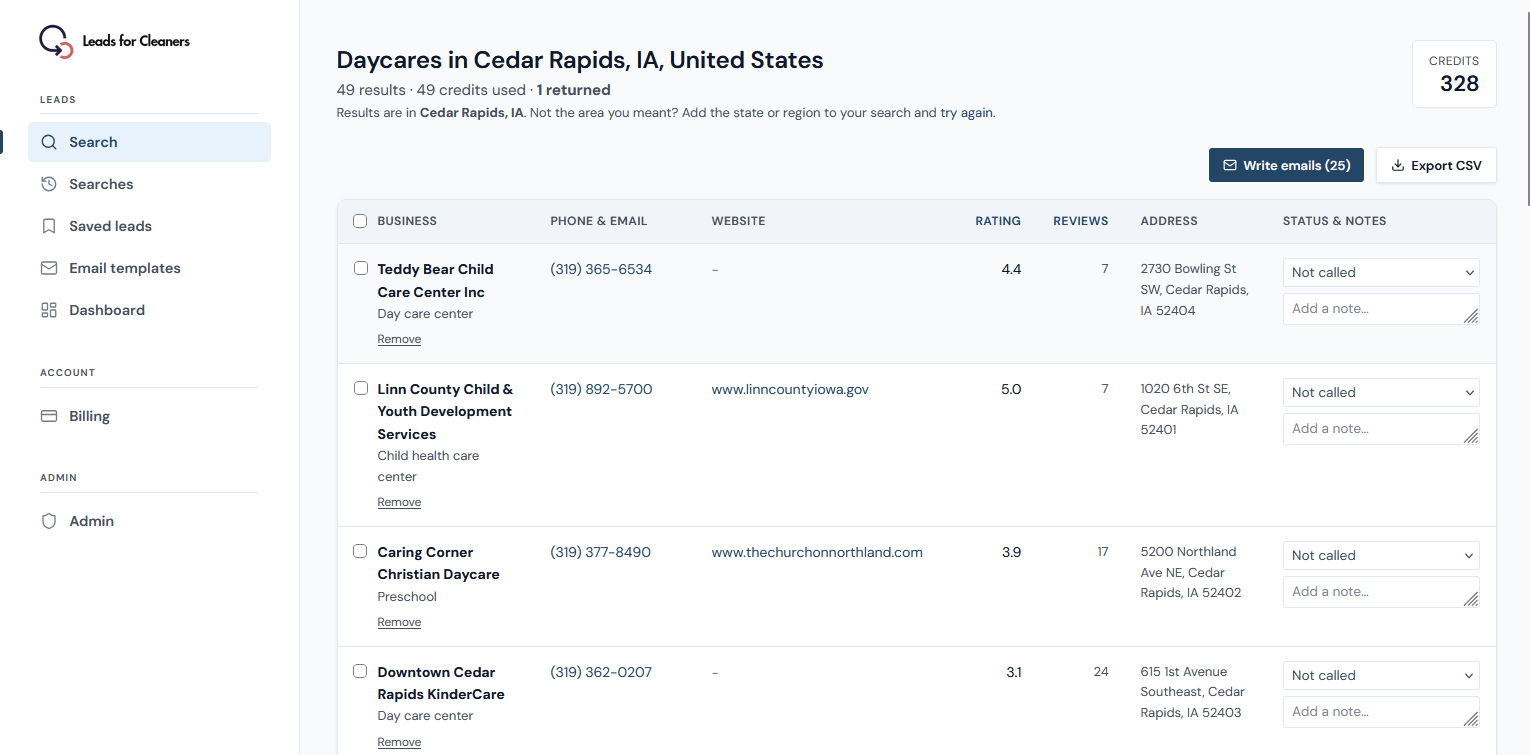
Write emails straight from your search results
Run a US search and click Write emails (N) on its results. N is the number of businesses with an email address that aren’t left out.
Emails come from US searches only, and only where the business lists one on its website, so you’ll never get one for every business. The address is the one the website shows, so expect some bounces.
A batch leaves out businesses marked Not interested, Wrong number / closed or Won, and skips ones already marked Emailed by default. A summary line says how many were left out and why. Branches sharing one email address get one email, so you don’t write to the same inbox twice.
Templates: subjects and messages, kept separately
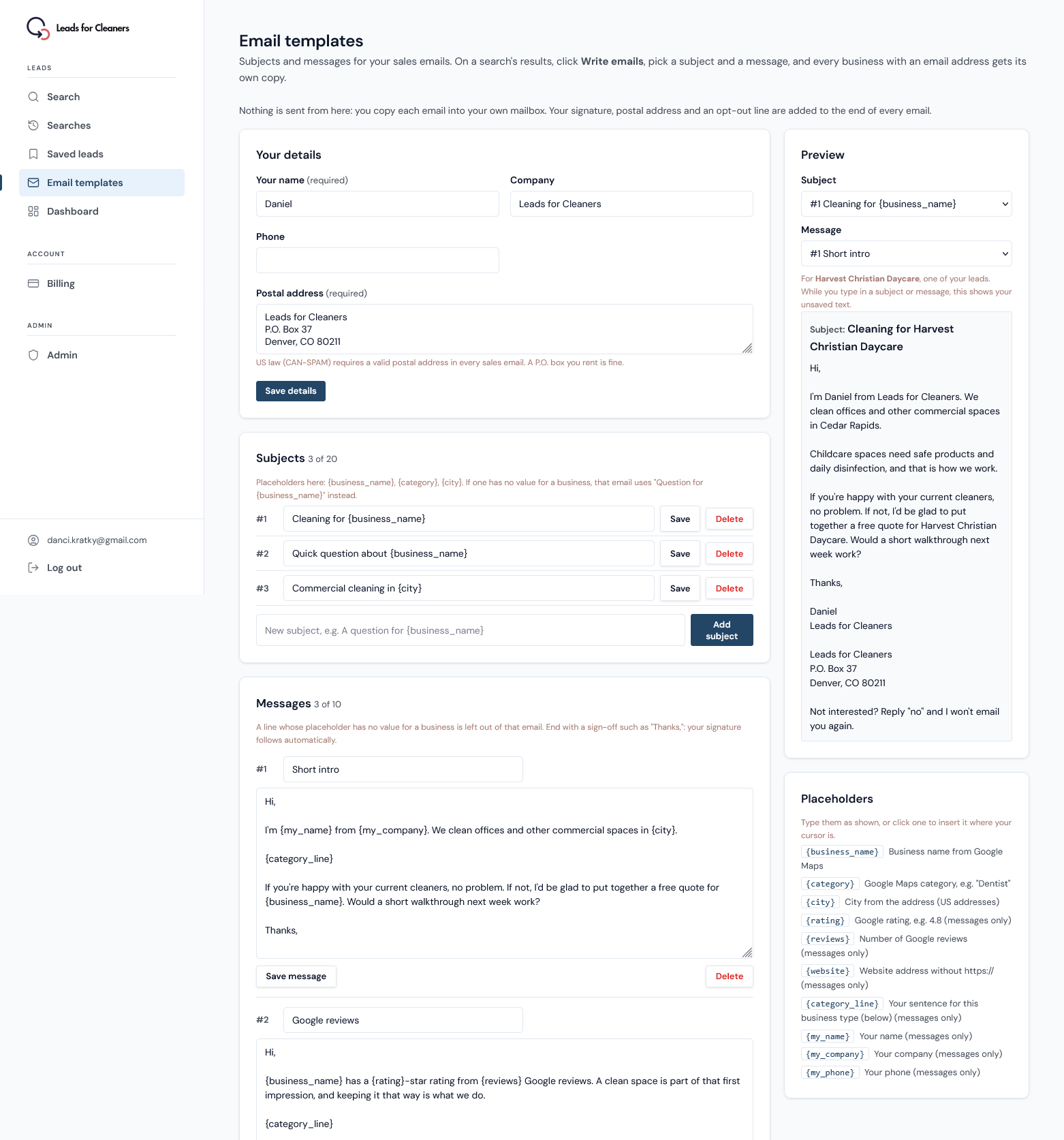
Subjects and messages live in two libraries: up to 20 subjects (one line, 150 characters) and 10 messages (5,000 characters). Each batch uses one of each, in any pairing, and the app remembers your last pair. Separate libraries let you try a new subject without rewriting the message. The catch: the app doesn’t record which pair went to which business.
Accounts get 3 ready-made subjects and 3 messages to edit or delete. They’re a starting point. For more, you can copy and paste from Cold Email Templates for Commercial Cleaning Contracts (Plain Text, Copy-Ready)
Placeholders that fill in each business
Placeholders are fields the app fills in per business. Subjects take fewer than messages. Everything comes from your app search (list) or from you.
| Placeholder | What it inserts | Where |
|---|---|---|
| {business_name} | Business name from app’s search | Subject and message |
| {category} | Business type, e.g. “Dentist” | Subject and message |
| {city} | City from the address (US only) | Subject and message |
| {rating} | Google rating, e.g. 4.8 | Message only |
| {reviews} | Number of Google reviews | Message only |
| {website} | Website, without https:// | Message only |
| {category_line} | Tailored sentence for this business type (saved in apps templates) | Message only |
| {my_name}, {my_company}, {my_phone} | Your sender details | Message only |
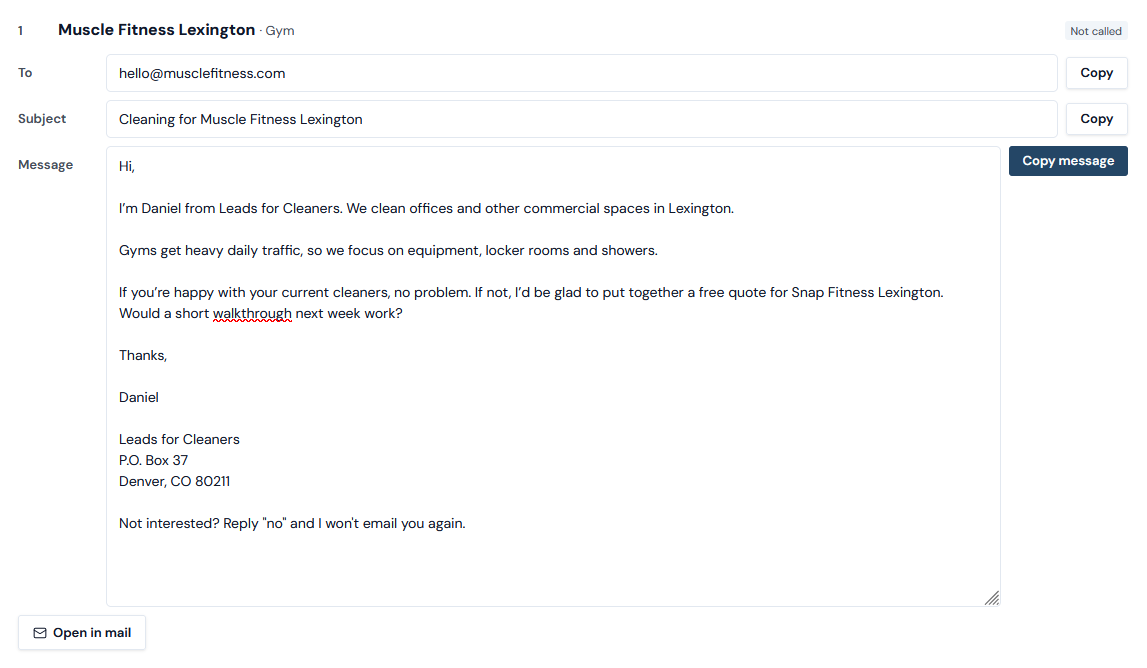
Here is one template and the email it becomes for a fictional dental office in Charlotte, with a fictional sender.
Subject: Cleaning for {business_name}
Hi,
I’m {my_name} from {my_company}. We clean offices and other commercial spaces in {city}.
{category_line}
If you’re happy with your current cleaners, no problem. If not, I’d be glad to put together a free quote for {business_name}. Would a short walkthrough next week work?
Thanks,
This becomes:
Subject: Cleaning for Collins Center Daycare
Hi,
I’m Daniel from Leads for Cleaners. We clean offices and other commercial spaces in Cleveland.
Childcare spaces need safe products and daily disinfection, and that is how we work.
If you’re happy with your current cleaners, no problem. If not, I’d be glad to put together a free quote for Collins Center Daycare. Would a short walkthrough next week work?
Thanks,
Daniel
Leads for Cleaners
P.O. Box 37
Denver, CO 80211Not interested? Reply “no” and I won’t email you again.
Rating and reviews are available; whether to use them is a writing choice.
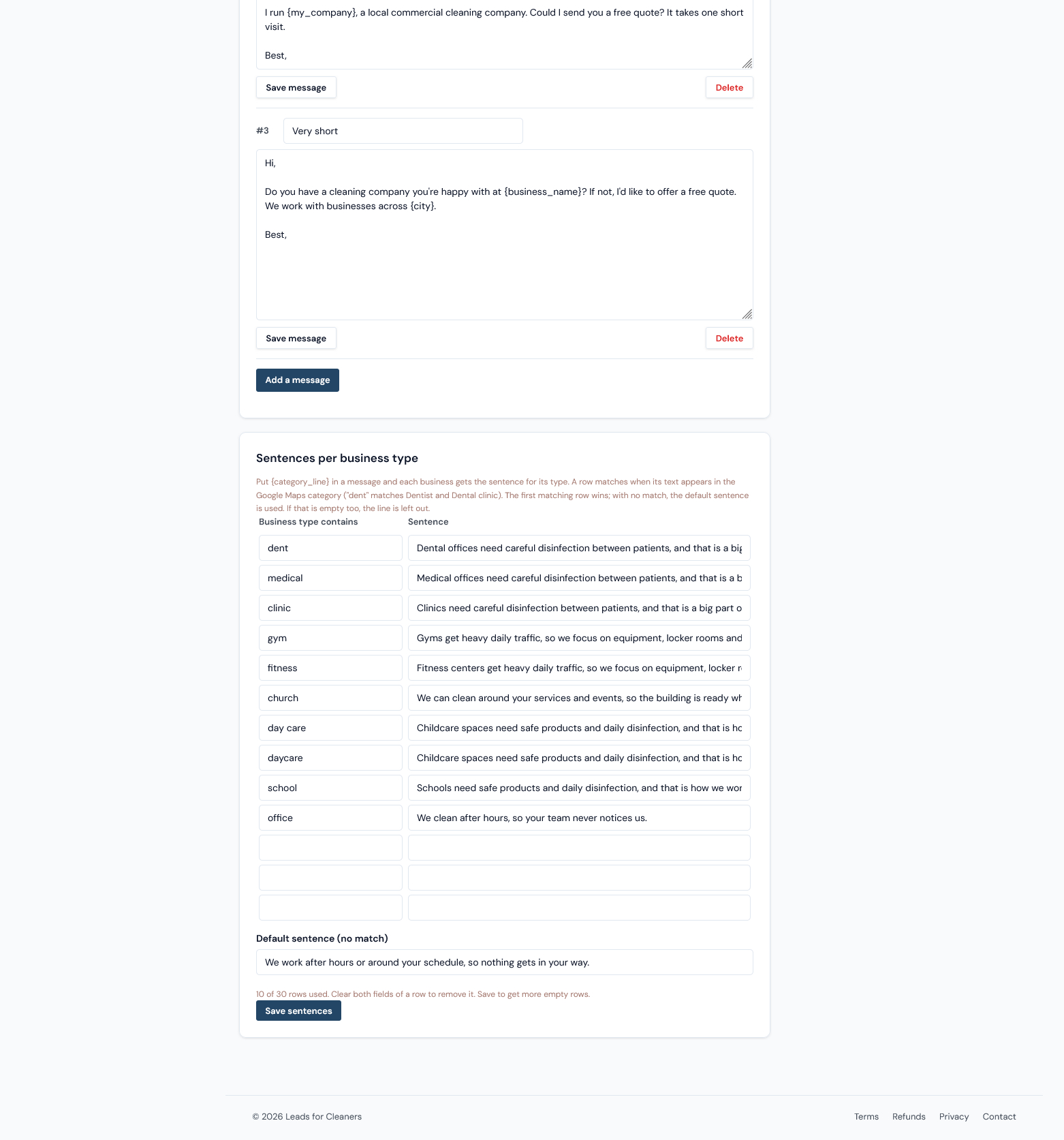
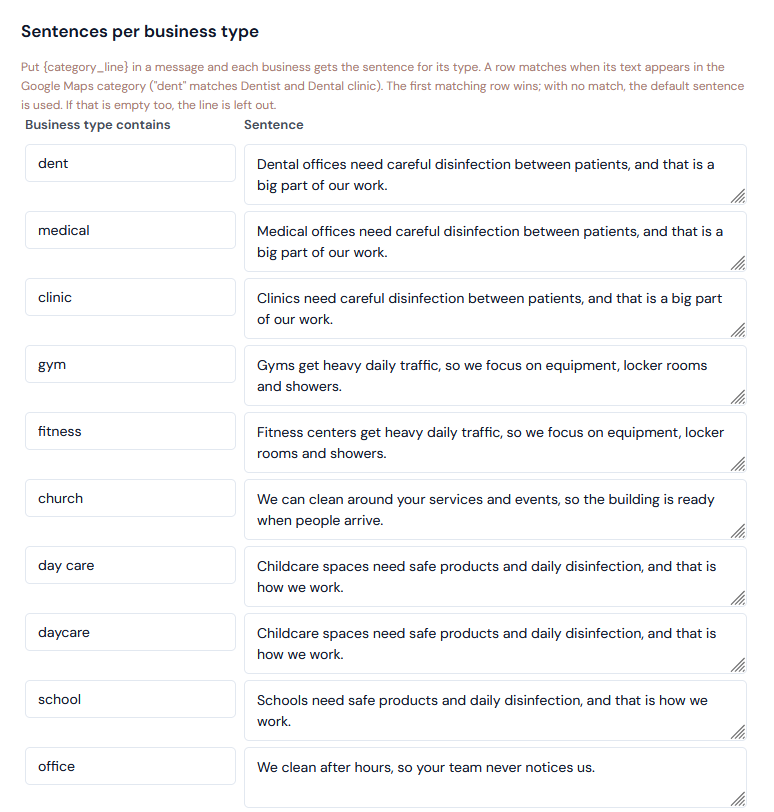
A line for each type of business
You can write up to 30 sentences, one per business type, plus a default. Each is matched against the business’s Google Maps category. No match gets the default sentence.
No broken emails when data is missing
If a message line’s placeholder is empty for a business, the app drops that line, so no email reads “rated stars”. An empty subject placeholder makes the subject “Question for {business name}”. City is read only from US-style addresses.
Write every line so the email still reads well if it’s dropped. Test by reading the template with each optional line covered. If a sentence leans on the one before it, rewrite it to stand alone.
Your signature and opt-out line
No emails appear until you add your name and a postal address. Every email then ends with a footer you can’t remove: your name, company, phone and address, then the opt-out line shown in the example above. That doesn’t make you compliant on its own; you’re responsible for what you send and for acting on opt-outs (see US email rules below).
Copy it or open it in your mail app
Each card shows To, Subject and Message, each with a Copy button, plus Open in mail, which opens your default mail app. You can edit text on the card, but edits aren’t saved. Using a mail-merge tool? Export CSV instead.
The app doesn’t send on purpose: replies land in your own inbox, and nothing goes out in your name unseen. The trade-off is manual copy&paste work. Write only as many as you can follow up by phone, and don’t send a whole batch at once from a new address (the templates post covers deliverability).
Emailed status, and next time you start where you stopped
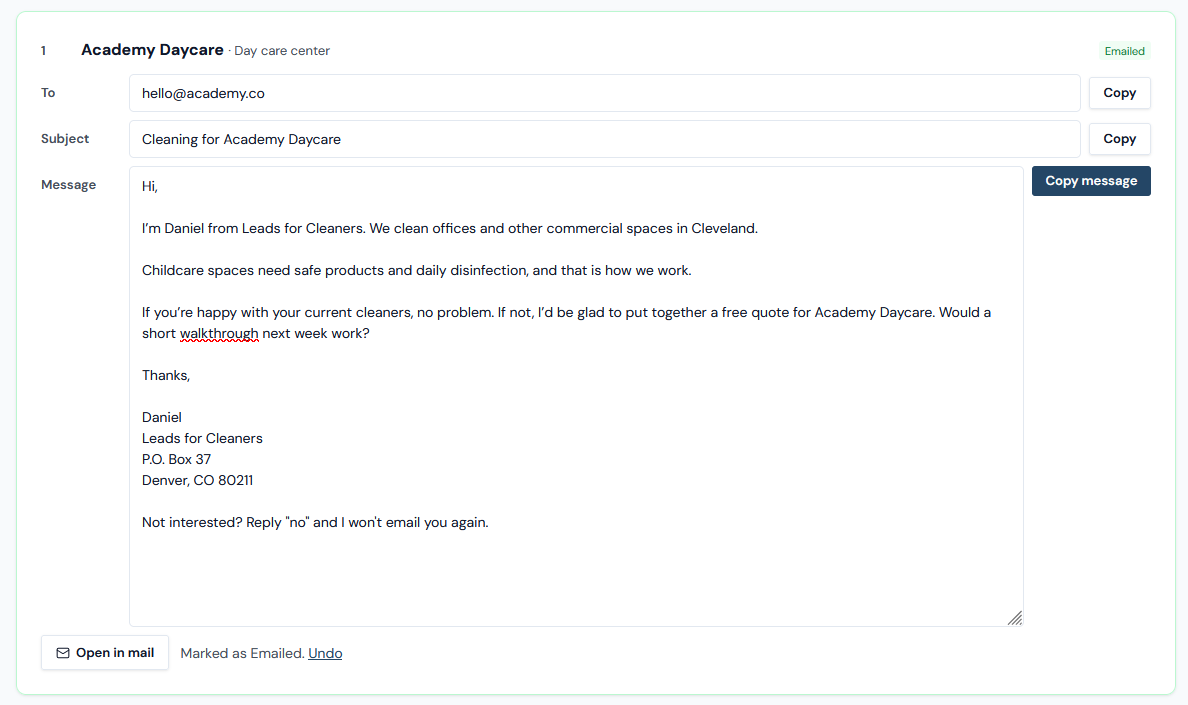
Copying the message or clicking Open in mail marks the business Emailed, but only if it was with ‘Not called’ status. Called and Callback keep their status. Copying only the To or Subject, or exporting CSV, changes nothing, so after a mail merge you update statuses yourself.
Copied but didn’t send? Click Undo on the card to put the business back to Not called status. Next time you open Write emails on that search, Emailed businesses are skipped by default, so you start where you stopped.
Also new: more statuses, Remove from search, Searches page
Statuses
There are now 8 statuses on the Search or Lead view. Open: Not called, Called, Emailed, Callback. Done: Not interested, Lost, Wrong number / closed, Won. Filter Saved leads by Open, Done or one status. If an older post told you to mark a lost deal as Called with a note, use ‘Lost’ or ‘Not interested’ now.
Remove from search
Takes a business off one search’s page and CSV export, singly or up to 100 at once. It stays in Saved leads. Credits aren’t returned, there’s no undo, and it can come back in another search.
Searches page
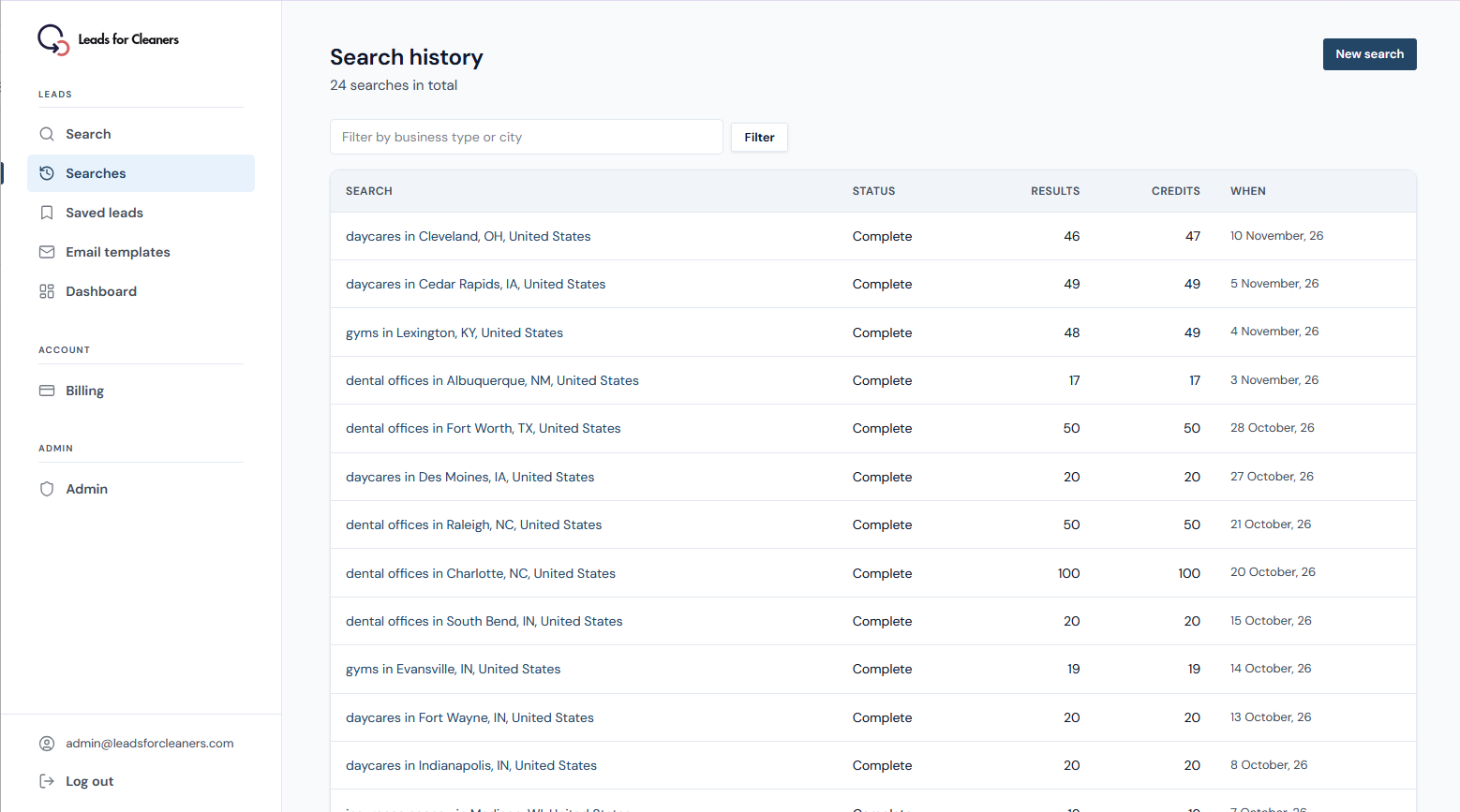
Every past search, newest first, 25 per page, filterable by business type or city. The search form still shows your latest 10, with a link here. Use it to reopen an old search instead of running it again.
What it doesn’t do
- It doesn’t send email, schedule it, or run sequences or follow-up emails.
- No reminders or follow-up dates. Keep those in your calendar.
- No open, click or reply tracking, and no results per template.
- Emails come from business websites and aren’t verified.
- Emails on US searches only. No decision-maker or owner names.
A note on US email rules
This section covers US law only. The FTC says the CAN-SPAM Act isn’t limited to large mailings, and it applies to business-to-business email too. Under the FTC’s CAN-SPAM compliance guide, you must honor an opt-out request within 10 business days. A reply of “no” is an opt-out: mark that business Not interested so it drops out of later batches. This is general information, not legal advice.
Try it
Already have an account? Open a saved US search and click Write emails. New here? Create a free account and run your first search. The email templates are included on every plan. On Free, only the businesses on your search that list an email will get one.